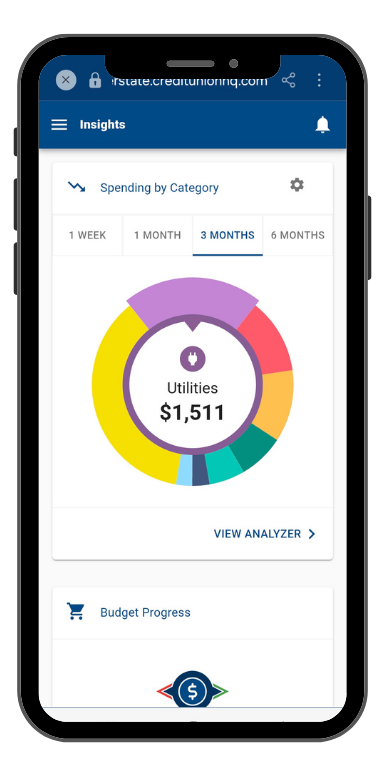


New Copper State CU Spending Wheel Feature

New Features In Mobile Banking

Hate friction? So do we! That's why we're all about speedy solutions and snazzy upgrades. Check out our latest updates and new releases within our mobile app!

checkmark 30 x 30
Rapid Transfers
Add a debit card from another institution to transfer money between your Copper State CU and external account within minutes.1
checkmark 30 x 30
Tap2Local for Businesses
Turn your smartphone into a contactless POS terminal to accept debit, credit, Apple Pay and Google Play.
checkmark 30 x 30
Transaction Enrichment
Transactions in mobile banking now include brand logos and simplified descriptions providing a more modern look and feel.
checkmark 30 x 30
Spending Wheel
This tool, which is found under your Insights tab, places your spending in colorful categories for an easier way to track your money.
Enroll in Mobile Banking
Send And Receive Money In Minutes

Make the Switch to Zelle®

Zelle® is a convenient way to send and receive money with friends, family and others you trust. Whether you're splitting the cost of a meal, gift, or trip, Zelle® makes it easy to pay your share. Over 100 million people are enrolled with Zelle®, so you can send money to friends and family even if they don't bank at Copper State Credit Union.2

Enroll in Mobile Banking
Zelle Soccer
New Mobile App

We Have An App For That

  1. Manage Your Money From Anywhere

    Your Copper State CU accounts are in the palm of your hand! Mobile banking offers you full access to everything you need, wherever you go in life.

  2. Transfer Money And Pay Bills

    No need to pull out the checkbook at the dining room table anymore! Pay your bills on-the-go and get back to the things that matter most.

  3. Deposit Checks Day Or Night

    Use mobile deposit to take a picture of your check and deposit it into the account of your choice. It's fast, easy and free.3

  4. Access Your Credit Score

    Access and track your credit score or report for free. Anytime, anywhere. The best part? Checking your credit score through our app will not negatively impact it.

  5. Open An Account Or Apply For A Loan

    Stay on track with your financial journey. You can open an account or apply for a loan straight from the mobile app!

Enroll in Mobile Banking
Hand holding a Copper State CU debit card
Manage your debit card right from your phone

Lock. Limit. Protect.

Our new debit card feature - located right in your mobile app - lets you instantly turn your card on or off, set spending limits and receive real-time alerts. It's the simplest way to manage your spending and protect your card from fraud.

  • Instantly turn your debit card on or off if it’s lost, stolen or being misused.
  • Get notified the moment your card is used.
  • Set spending limits and prevent purchases that don’t meet your preferences.
  • Online or in the app, select your account, go to “Card Management”, choose a card and click “Alerts & Protections”.
Enroll in Mobile Banking
The Best App For On The Go!

What our members are saying about our mobile app!

Copper State Credit Union
Charles M.

I really enjoy and feel secure with the two factor authentication code.

start
Copper State Credit Union
Thomas D.

The platform is easy to use and also faster than most.

start
Copper State Credit Union
Diane N.

I love the app it makes life easy.

start
Copper State Credit Union
Nancy A.

Easy to use. All needed information at my fingertips.

start
Copper State Credit Union
Leticia L.

I'm very happy with the new online banking system very easy to use, convenient and useful.

start
Copper State Credit Union
Kathleen S.

Very easy to do anything I need to on the mobile app. Extremely pleased!

start
Copper State Credit Union
Carolina A.

Easy and friendly to navigate.

start
Copper State Credit Union
Veronica B.

I feel secure in using it and very easy to navigate.

start
Copper State Credit Union
Margaret D.

I am 65 and resisted online banking. What a mistake! Your staff trained me and it is just so easy to navigate!

start

Mobile Deposit Features

Using our modern mobile banking app and the camera on your smartphone or mobile device, you can deposit checks in seconds. All checks must be endorsed on the back with your signature.

checkmark 30 x 30
Save Time
Deposit checks quickly and easily once enrolled.
checkmark 30 x 30
Safe And Secure
Our app and mobile deposit offer safeguards to protect your transactions.
checkmark 30 x 30
Maintain Your Records
You can keep the paper check for your records after you have deposited it.
checkmark 30 x 30
Receive Confirmation
Receive electronic confirmation when the transaction goes through.
Enroll in Mobile Banking
man on cell phone entering a mobile deposit
yellow-lightbulb-spot
Ready To Use Mobile Deposit?
Just enroll in Mobile Banking and download the Copper State Credit Union mobile app.4

Log In With Smart Access

  • Quick Access To The App

    No need to type a password. Your fingerprint or facial recognition scan is all you need to access our mobile app.

  • Easy-To-Follow Instructions

    For enabled devices, you will see an information screen in the login area of the Copper State Credit Union mobile app. Follow the directions to enable fingerprint access.

  • Works With Apple Devices5

    iPhone requires iOS 18.4 or later and iPadOS requires iPadOS 18.4 or later.

  • Works With Android Devices6

    Requires Android OS 10 or newer.

family looking onto dads cell phone
Security And Mobile App Access In One Touch
Don't waste time trying to remember your password when you want quick access to our mobile banking app. High-tech biometric technology eliminates the need for our Arizona members to use a password to check balances, transfer funds or pay bills.
Enroll in Mobile Banking

Bill Pay Features

Pay a bill immediately, schedule payment for a future date or set up recurring bills to pay automatically. Bill Pay also keeps a history of the bills you've paid. Enroll today, it's free for all members. 

checkmark 30 x 30
Pay Bills Now Or Later
You can pay a bill immediately or schedule a payment for a future date.
checkmark 30 x 30
Bill Payment History
The bills you've paid are all saved in Bill Pay so you can see them anytime.
checkmark 30 x 30
Recurring Payments
Set up recurring payments to pay bills that are the same each month and save time.
checkmark 30 x 30
It's Totally Free
That's right, Bill Pay is free for all Copper State CU members.
Enroll in Mobile Banking
Woman on couch using her phone
yellow-lightbulb-spot
Schedule Future Payments
Schedule future bill payments and account transfers to make money management easier.
Young woman traveling
yellow-lightbulb-spot
Keep Your Information Secure
Receiving statements and tax forms in Mobile Banking is the safest way to get account info.

eStatement Features

Reduce the risk of fraud by electing to receive your statements electronically rather than through the mail. You'll also save on the $2/month paper statement fee, get your statements faster, and have tax information readily available.7

checkmark 30 x 30
Receive Statements Faster
eStatements are available the moment they're ready. No waiting for the mail to arrive.
checkmark 30 x 30
Reduce Fraud Risks
Paper statements can be lost in the mail or taken from your recycling. Stay safer online.
checkmark 30 x 30
Save Money
You'll save on the $2/month paper statement fee. That's an extra $24 per year!
checkmark 30 x 30
Get Tax Paperwork Fast
Tax forms will be loaded into Online Banking as soon as they're ready each year.
Enroll in Mobile Banking
Keep Your Information Safe

Mobile Banking Is The Secure Choice

Mobile Banking is the safest way to manage your money and store account information. Sending statements, checks, and other information via mail creates the possibility for fraud and unnecessary risk. With eStatements, you don't have to worry about account numbers making their way into the recycling bin.

Enroll in Mobile Banking now so you can manage your money with confidence and have the convenience of 24/7/365 account access from anywhere. Services like Bill Pay, eStatements and more are completely free and easy to use. Get started today when you enroll in Mobile Banking.

Enroll in Mobile Banking

Disclosure

1Funds availability may vary depending on the receiving financial institution. 

2To send or receive money with Zelle®, both parties must have an eligible checking or savings account. Transactions between enrolled users typically occur in minutes.
Zelle® and the Zelle® related marks are wholly owned by Early Warning Services, LLC and are used herein under license.

3Enrollment is required and must be approved before deposits can be submitted.

4Data charges from your carrier may apply.

5Apple, the Apple logo, iPad Air and iPhone are trademarks of Apple Inc., registered in the U.S. and other countries. Apple Pay, iPad mini and Touch ID are trademarks of Apple Inc. IOS is a trademark or registered trademark of Cisco in the U.S. and other countries and is used under license.


6Android is a trademark of Google LLC.

7For members who prefer paper statements, a $2 monthly fee will be assessed to their account, except for those members over the age of 65 or 17 years of age and younger.


Online Banking

Secure Access 24/7
Reset Username/Password

Sign In

New User? Register Now